This article details how to setup and edit your billing information in CyberHoot’s Power platform.

Once you’ve logged in to CyberHoot, click on your name in the top right.

Next, select ‘Account’

Select the ‘Subscription’ tab

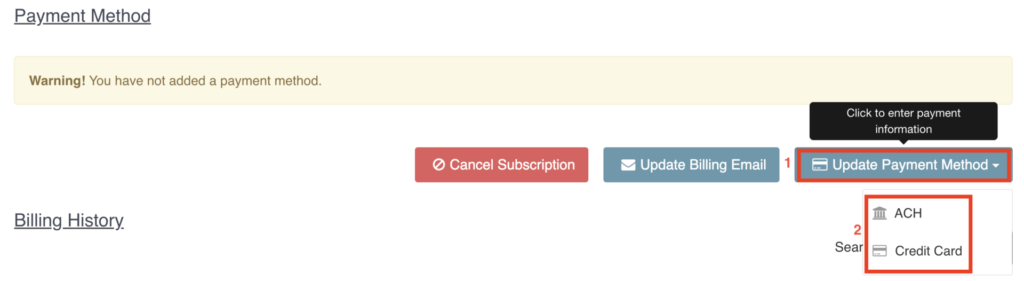
1. Click on ‘Update Payment Method’ button
2. Choose “ACH” or “Credit Card”
3. Enter payment information

Note: If you’d like to subscribe to our newsletter, visit the Newsletter link below and enter your email address on the right-hand side of the page, and click ‘Send Me Newsletters’.

Oh hi there 👋
It’s nice to meet you.

Sign up to receive awesome content in your inbox, every month.

We don’t spam! Read our privacy policy for more info.

Oh hi there 👋
It’s nice to meet you.

Sign up to receive awesome content in your inbox, every month.

We don’t spam! Read our privacy policy for more info.

This article details how to setup and edit your billing information in CyberHoot’s Power platform.
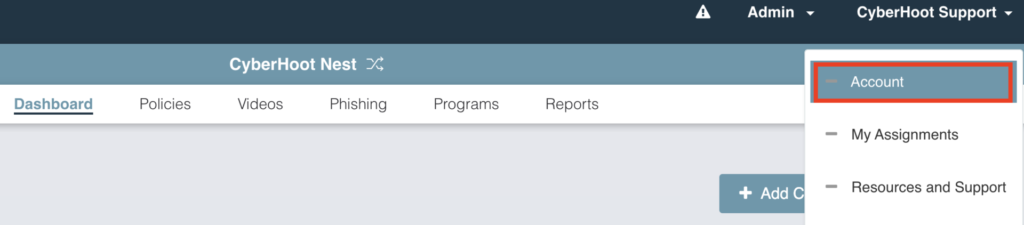

Once you’ve logged in to CyberHoot, click on your name in the top right.

Next, select ‘Account’

Select the ‘Subscription’ tab

1. Click on ‘Update Payment Method’ button
2. Choose “ACH” or “Credit Card”
3. Enter payment information

Note: If you’d like to subscribe to our newsletter, visit the Newsletter link below and enter your email address on the right-hand side of the page, and click ‘Send Me Newsletters’.

By rooter