
Power Platform:
You can manually send the welcome email two ways:
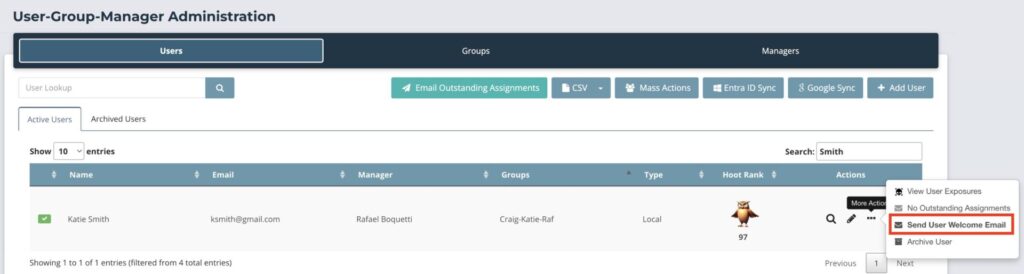
Individually: Under “User-Group-Manager” in the “Users” tab, you can click on the 3 dots for more actions and you can send the welcome email to that individual user there.
Mass Action: Under “User-Group-Manager” in the “Users” tab, click on “Mass Actions”. Then there will be a pop-up where you can select the users you want, select the action as “Send User Welcome Email” and click “Execute Action”.
Autopilot Platform:
You can manually send the welcome email two ways:
Individually: Under “Users” , you can click on the 3 dots for more actions and you can send the welcome email to that individual user there.
Mass Action: Under “Users”, click on “Mass Actions”. Then there will be a pop-up where you can select the users you want, select the action as “Send User Welcome Email” and click “Execute Action”.