
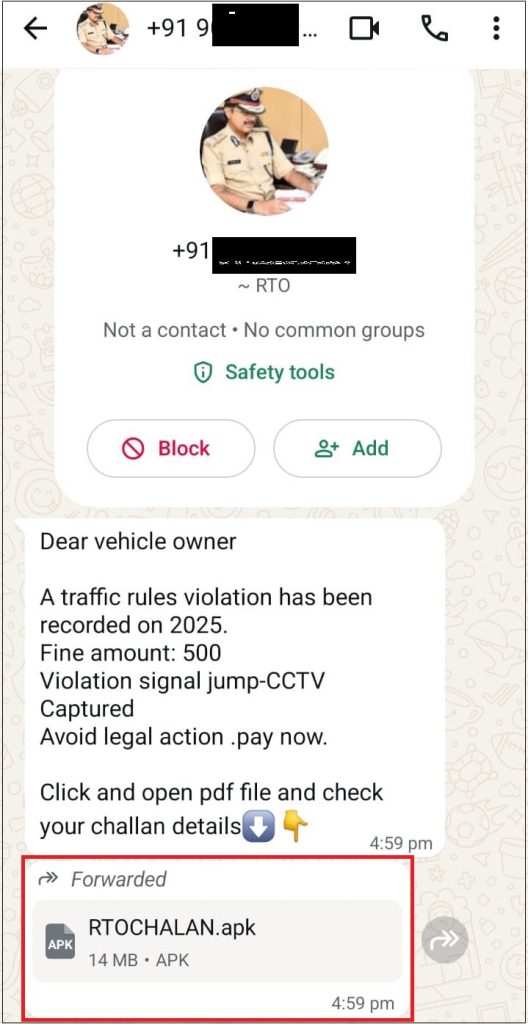
In recent years, Android malware campaigns in India have increasingly abused the trust associated with government services and official digital platforms. By imitating well-known portals and leveraging social engineering through messaging applications, threat actors exploit user urgency and lack of verification, resulting in large-scale financial fraud and identity theft.
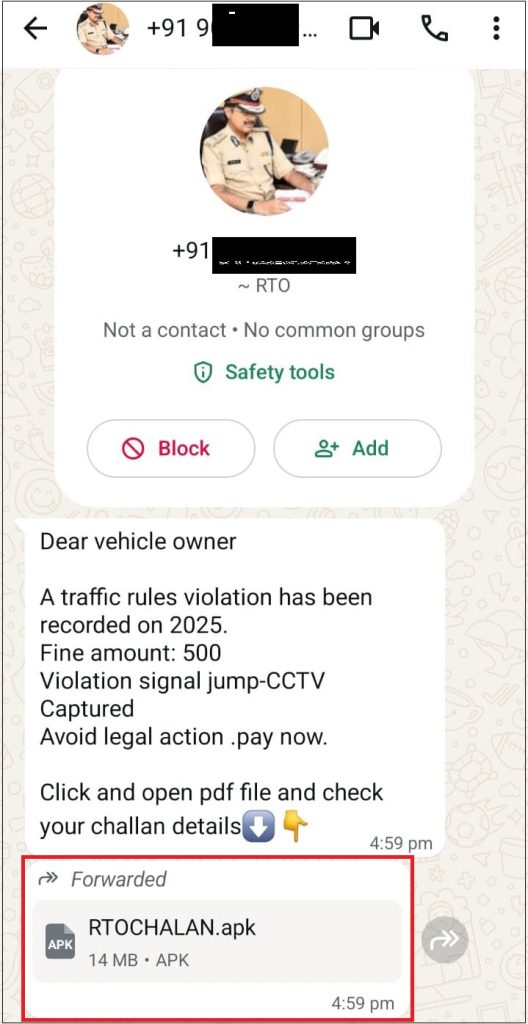
At Seqrite labs, during our security research, we identified an active Android malware campaign targeting Indian users by impersonating government services, particularly RTO challan notifications and official alerts. These malicious applications are distributed outside the Google Play Store and are primarily shared through WhatsApp and similar messaging platforms.
This campaign represents an evolution of previously observed RTO-themed Android malware, incorporating improved anti-analysis technique, a modular multi-stage architecture, and a more structured backend ecosystem for data collection and remote operations.
Campaign Overview
We observed a three-stage Android malware campaign in the wild, primarily targeting Indian users by masquerading as RTO challan and government-related applications. The malware is distributed outside the Google Play Store and relies on cloud-based backend services for data exfiltration and command-and-control (C2) communication.
Each stage is delivered as a separate APK and is installed sequentially, forming a chained execution flow designed to:
- Maximize infection success
- Maintain long-term persistence
- Perform covert monetization
- Harvest sensitive user data
This modular design allows threat actors to replace or update individual stages without modifying the entire campaign, significantly improving operational flexibility and evasion.
Multi-Stage Infection Chain
The overall execution flow observed is as follows:
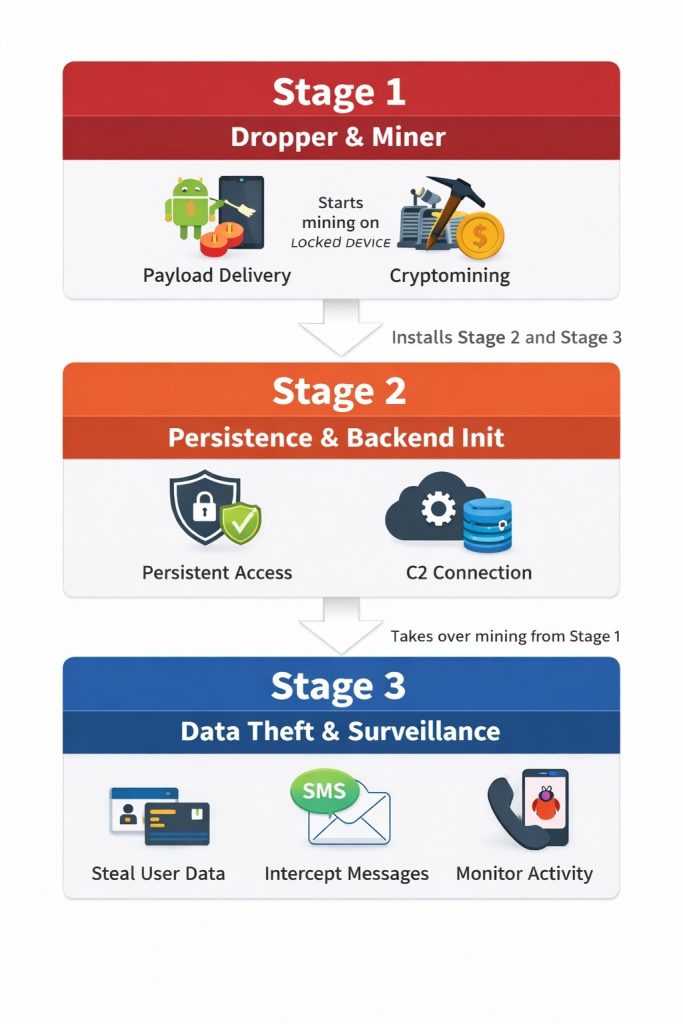
Each stage performs a distinct function while remaining tightly integrated with the attacker-controlled backend.
Stage 1 – Dropper and Cryptominer
Primary Functions
- Acts as a dropper for Stage 2 and Stage 3 payloads
- Performs cryptocurrency mining when the device is locked
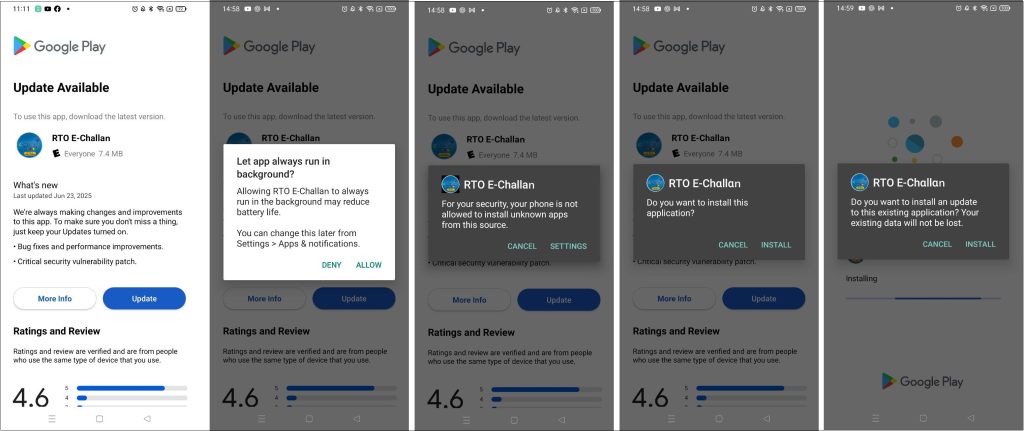
The first-stage application initiates the infection chain by decrypting and installing subsequent stages (refer to Figure 3). In parallel, it executes a cryptomining module that activates when the device screen is turned off, minimizing user suspicion and visual indicators of malicious activity (refer to Figure 4).
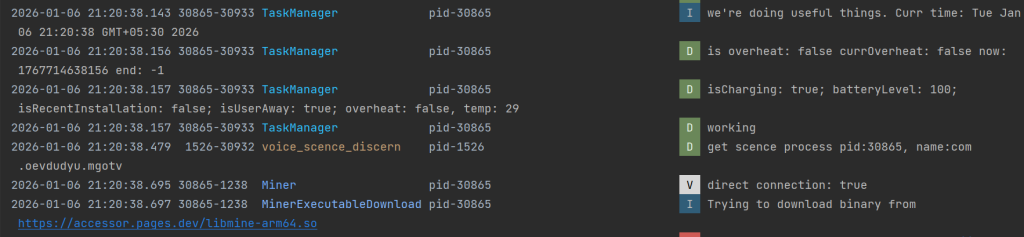
This behavior is consistent with previously documented Android cryptojacking campaigns, where mining operations are deferred until user inactivity to evade detection. Refer to our earlier research – Android Cryptojacker Masquerades as Banking App to Mine Cryptocurrency on Locked Devices
Once the second-stage application is successfully installed, the mining activity of Stage 1 is terminated, and control is transferred to the next component.
Stage 2 – Persistence, Backend Initialization, and Mining
Primary Functions
- Establishes persistence mechanisms
- Initializes backend connectivity
- Initiates its own cryptomining activity
After being deployed by Stage 1, the second-stage application ensures long-term persistence by registering multiple broadcast receivers, hiding its launcher icon, and maintaining continuous background execution.

At this stage, the malware initializes connectivity with its cloud-based backend infrastructure here it is Google’s firebase (refer to Figure 5), which is later used for:
- Victim data storage
- Remote configuration
- Command-and-control communication
Stage 2 also starts an independent cryptomining process, making it both a control layer and a monetization component. This stage effectively acts as a bridge between the initial infection logic and the final surveillance payload.
Stage 3 – Data Theft and Surveillance
Primary Functions
- Social engineering via fake government UI
- Collection of PII and financial information
- Backend-driven C2 communication
- SMS forwarding, notification theft, and call redirection
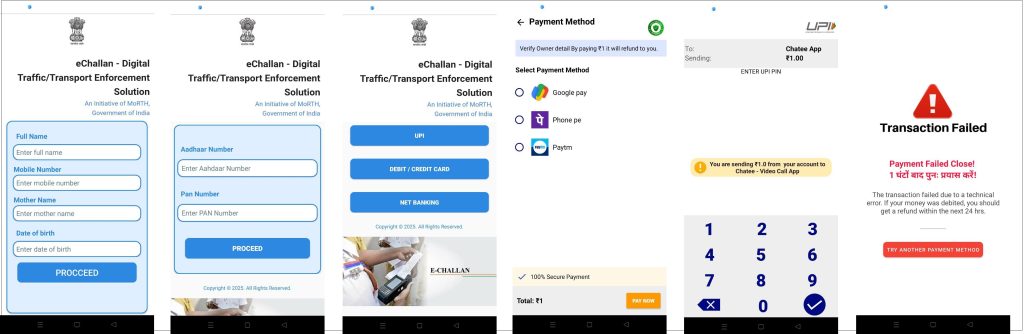
Upon installation, the third-stage application presents a fraudulent user interface mimicking official government portals, complete with RTO branding and logos. The app prompts users to verify their identity or clear a pending challan.
To proceed, users are instructed to grant multiple high-risk permissions, including SMS access, Call logs, Notification listener, Storage access, etc.
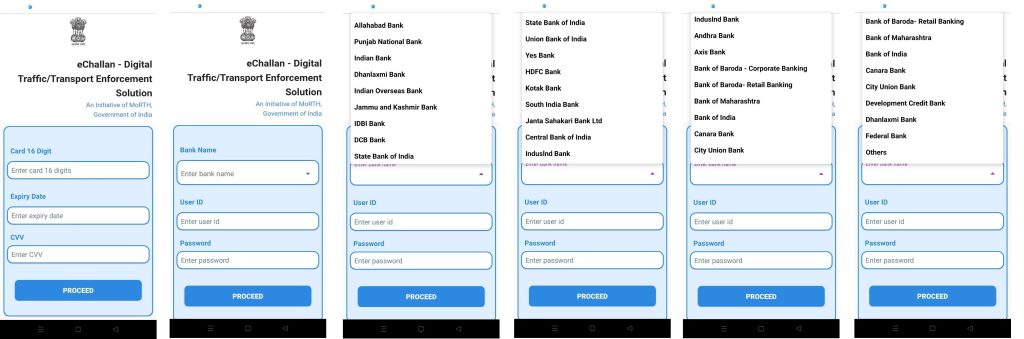
Once these permissions are granted, the malware begins harvesting:
- Personal identity information
- Banking and financial notifications
- OTP messages and transaction alerts
- Device metadata and system information
All collected data is transmitted to the attacker-controlled backend in structured JSON format and stored for further processing. This behavior is consistent with previously documented NextGen mParivahan Malware campaign. Refer to our earlier research – Beware! Fake ‘NextGen mParivahan’ Malware Returns
Backend Infrastructure Access
After analyzing the multi-stage malware, we were able to obtain access to the backend infrastructure used by the threat actors. This provided rare visibility into the operational side of the campaign and allowed us to assess the true impact, scale, and capabilities of the malware ecosystem.
The backend was actively used to store stolen data as well as to control infected devices in real time.
Stolen Data Types
The backend infrastructure contained highly sensitive and security-critical information, including:
- Personally Identifiable Information (PII): Full name, Phone number, Date of birth, Mother’s name, Aadhaar number, PAN number
- Financial and Credential Data: UPI PINs, Credit card details, Net banking usernames and passwords
- Surveillance Data: Intercepted SMS messages, Notification contents, Device status information
This indicates that the malware was not limited to basic phishing but functioned as a full-scale identity theft and financial fraud platform.
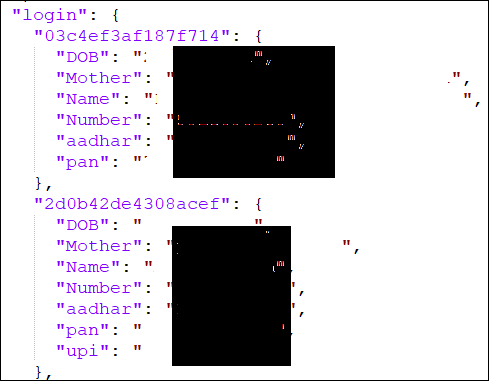
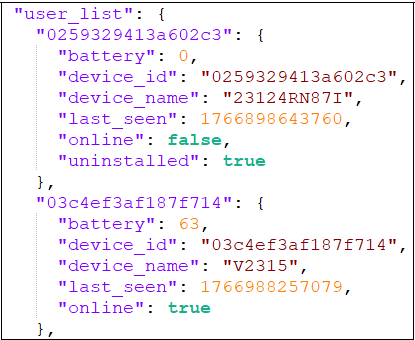
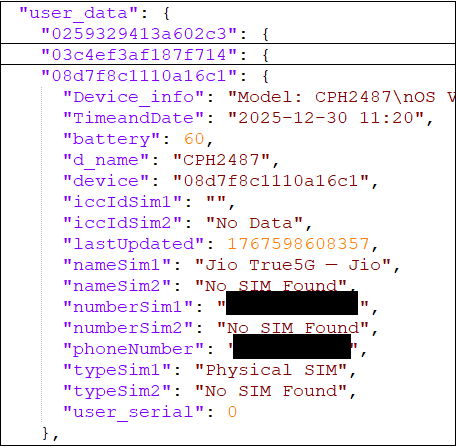
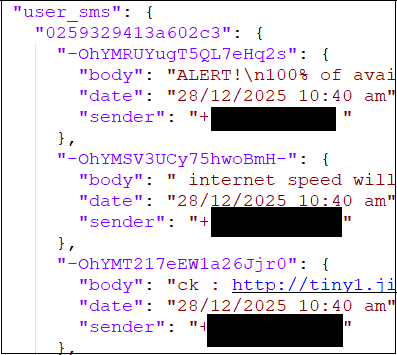
Fig. 8 shows a structure in which data is stored by threat actors.
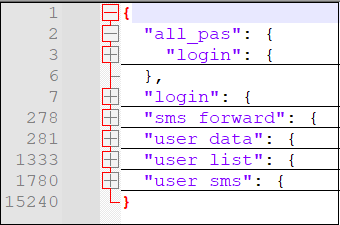
Data collected from user under login page stored in below format –
To identify user and device, device information and other details collected it is stored in this format –
Collected messages stored in below format –
Backend as Command-and-Control (C2)
Beyond acting as a data repository, the backend infrastructure was actively used as a command-and-control (C2) system.
C2 Capabilities Observed
- Remote configuration – Dynamic configuration of SMS forwarding phone numbers
- Tracking and Monitoring – SMS forwarding status, Call forwarding status, Device activity
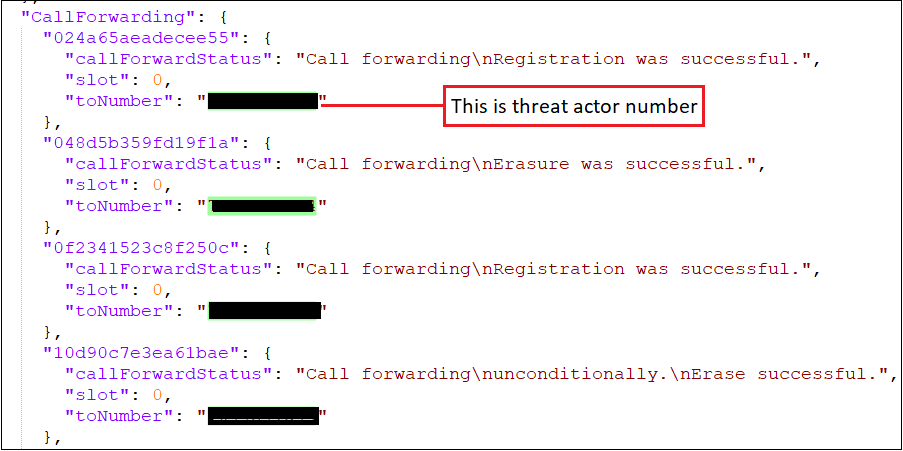
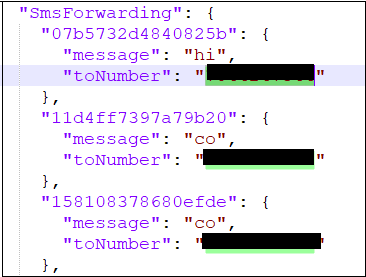
- Centralized control – Live monitoring of infected devices, Operational status of malware deployment
Effectively, the backend functioned as a central control panel for the operators, enabling them to:
- Manage stolen victim data
- Monitor campaign performance
- Remotely control malware behavior
This confirms the presence of a well-organized and operationally mature threat infrastructure, rather than an amateur or one-off campaign.
Infection Scale and Victim Impact
Based on the records available in the backend infrastructure, approximately 7,400 devices were infected. Not all victims provided every permission or submitted all requested data, but a significant number allowed SMS access and submitted highly sensitive personal and financial information
This demonstrates a large-scale, sustained, and successful compromise of real users, with long-term financial and privacy implications.
Evolution Over Earlier RTO Malware Campaigns
Compared to previously documented RTO and mParivahan malware, this campaign shows significant operational improvements:
| Earlier Variants | Current Campaign |
| Single-stage APK | Three-stage modular architecture |
| Hardcoded logic | Dynamic remote configuration |
| No or less anti-analysis technique | Extensive use of Anti-analysis technique |
| Limited data theft | Full surveillance toolkit |
| No monetization | Dual monetization (fraud + mining) |
These advancements indicate that threat actors are actively refining their tactics, reusing successful components while continuously improving backend operations and persistence mechanisms.
Potential Abuse Scenarios
Based on observed capabilities, the malware enables several high-risk abuse scenarios, including:
- Real-time OTP interception for financial fraud
- Bank account takeover via credential harvesting
- SIM swap facilitation using stolen identity data
- Loan and credit fraud using Aadhaar and PAN details
- WhatsApp and social media account hijacking
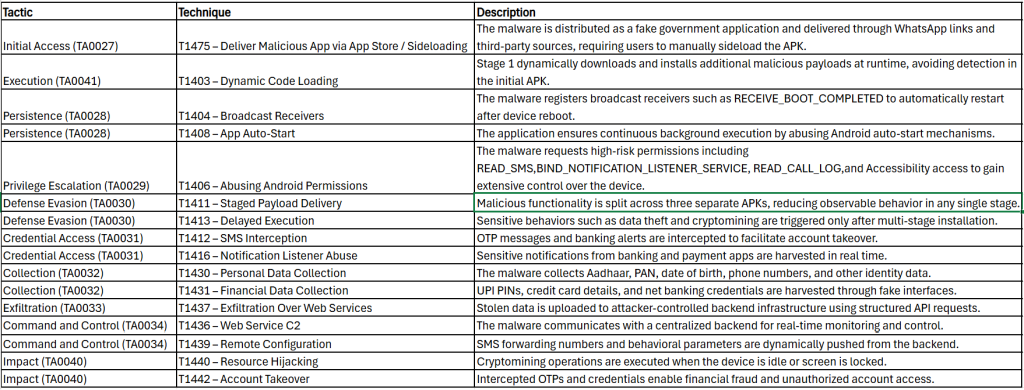
MITRE ATT&CK Tactics and Techniques:
Quick Heal Detection of Android Malware:
Quick Heal detects such malicious applications with variants of Android.Dropper.A
It is recommended that all mobile users should install a trusted Anti-Virus like “Quick Heal Mobile Security for Android” to mitigate such threats and stay protected. Our antivirus software restricts users from downloading malicious applications on their mobile devices. Download your Android protection here
Conclusion
This campaign represents a significant escalation in Indian Android malware operations, combining social engineering, modular architecture, cloud-based command infrastructure, and real-time financial surveillance. The three-stage design, coupled with cryptomining and centralized control, indicates a highly organized threat group focused on long-term exploitation rather than opportunistic attacks.
TIPS TO STAY DIGITALLY SAFE:
- Download applications only from trusted sources like Google Play Store.
- Do not click on any links received through messages or any other social media platforms as they may be intentionally or inadvertently pointing to malicious sites.
- Read the pop-up messages from the Android system before accepting or/allowing any new permissions.
- Be extremely cautious about what applications you download on your phone, as malware authors can easily spoof the original applications’ names, icons, and developer details.
- For enhanced phone protection, always use a good antivirus like Quick Heal Mobile Security for Android.
Don’t wait! Secure your smartphones today with Quick Heal Total Security for Mobiles & Smartphones – Buy or Renew Today!
The post Inside a Multi-Stage Android Malware Campaign Leveraging RTO-Themed Social Engineering appeared first on Blogs on Information Technology, Network & Cybersecurity | Seqrite.